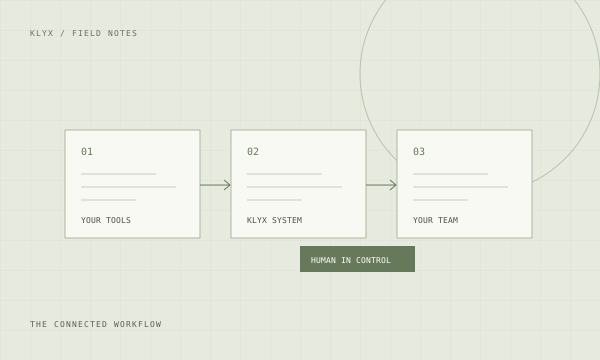
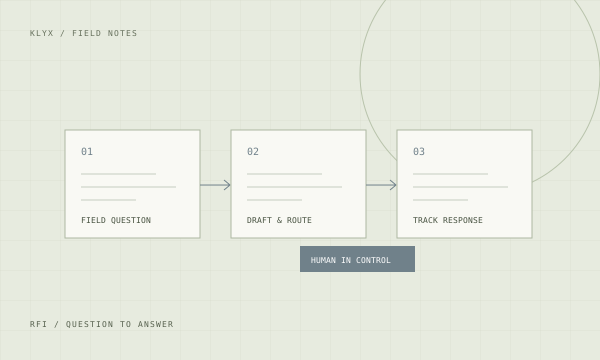
KLYX organizes RFIs and submittals for commercial drywall and metal stud framing subcontractors. Questions and packages connect to the job, current drawings, required response, and responsible reviewer. Draft preparation and follow-up can be automated. Your team retains technical review and submission approval, with unresolved items visible across active jobs.
A response in one PM’s inbox is not a usable field instruction until the right people receive it. A revised submittal is not approved because someone uploaded it. The missing piece is a consistent record of revision, responsibility, response, and distribution.
ProcoreAutodesk BuildBluebeamOutlook
Integration access and capabilities are confirmed during discovery.
WHAT THE SYSTEM CAN HANDLE
01
Prepare RFI drafts with source drawing references
02
Track submittal revisions and reviewer responses
03
Surface open items by required date and responsible person
04
Route reviewed answers to the affected project team
You set the approval boundary.
Drafts and recommendations are reviewed by your team before a pricing decision, technical response, submission, or purchasing commitment.
Bring a representative example, the tools involved, and the person who owns the workflow.
02
Define the review steps
Agree on permissions, source records, approval boundaries, and exception handling.
03
Pilot and measure
Test on a limited scope, compare against your baseline, and train the team before expanding.
For drywall & framing contractors.
Connect framing-depth, head-of-wall, finish-level, and assembly questions to the affected area and document revision. Keep product submittals for board, track, insulation, and ACT associated with the requirement they address. A rejected or revised package should keep its history instead of looking like an unrelated new upload.
When a response changes the planned work, flag it for scope and pricing review. An answered RFI does not establish that the added work has been priced or authorized. Keep the technical question and the commercial decision connected without treating them as the same approval.
Also serving commercial specialty subcontractors.
Electrical, mechanical/HVAC, plumbing, concrete, roofing, and other specialty subcontractors face related handoff problems. We map the workflow around your scope, records, and approval responsibilities. The drywall examples show the level of detail we look for; they do not limit who can start with an Operations Review.
BEFORE WE BUILD
Your questions, answered.
Can AI answer a framing-depth RFI?
+
It can organize the question and point to the source material supplied for review. It should not invent an engineering answer or choose an assembly. Your qualified reviewer checks the question, and the responsible project party provides the technical response.
Can it track board and track submittal revisions?
+
Yes. The workflow can keep package identity, revision, submission date, status, and response together. Your reviewer confirms whether the current package satisfies the requirement. The specific record and approval steps depend on the project tools and contract workflow.
How are level-of-finish questions handled?
+
Tie the question to the room or area, drawing, specification, and current revision. Route it for technical review and track the answer. If the answer affects scope, labor, or material, create a separate commercial review action rather than assuming the response authorizes a price change.
Will foremen receive every unreviewed draft?
+
No. Distribution rules distinguish a draft from an approved response. Your team defines who reviews technical content and which field recipients need the final instruction. Unmatched or conflicting records go to an exception queue for a person to resolve.
Does this work with the software we already use?
+
We assess Procore, Autodesk, Bluebeam, Microsoft 365, QuickBooks, and Foundation where relevant to the workflow. Access depends on your account, permissions, and available interfaces. The audit confirms what can connect, what needs a reviewed handoff, and which record remains the source of truth.
A polished meeting summary does not establish who agreed to do what. Use AI to draft a source-backed action register, then have the project team confirm owners, dates, and decisions before distribution.
Most lookahead schedules are a reformatted copy of the master schedule, which is why nobody reads them. A lookahead earns attention when it tracks constraints and commitments instead of restating intentions.
Submittal packages get assembled by hand, revised by hand, and tracked in a spreadsheet nobody trusts. A better path from specification section to approved package.
You do not need to replace your project management system to automate the work around it. A sequenced plan for commercial contractors, starting with one workflow.
Plans, specs, transmittals, invoices, and correspondence pile up faster than anyone files them. How AI-assisted document handling makes project records findable and usable.
The schedule rarely slips all at once. It slips through unanswered questions, late approvals, and material dates nobody checked. Where analysis helps and where it oversells.
You cannot hire your way out of a skilled labor shortage quickly. You can stop spending experienced people's hours on work that does not require experience.
Project email is where directives, approvals, and commitments hide. A triage approach that turns an unmanageable inbox into a reviewed queue with owners.
New project engineers take months to become productive because the knowledge lives in people's heads. How to capture it and shorten the ramp without pulling seniors off work.
Prefabrication succeeds or fails on information timing. Where automation helps coordinate design release, shop capacity, and field sequence for commercial contractors.
Clash detection produces long reports and limited field benefit when the resolution process is missing. How to turn detected clashes into resolved conditions.